THESCORE (PENN ENTERTAINMENT)
THESCORE (PENN ENTERTAINMENT)
Line-Up
Line-Up
An internal tool for 1000+ employees to navgiate organizational structure and find cross-functional ownership.
An internal tool for 1000+ employees to navgiate organizational structure and find cross-functional ownership.
INTRODUCTION
INTRODUCTION
theScore has 1000+ employees and it can be hard finding who owns what.
theScore has 1000+ employees and it can be hard finding who owns what.
It’s becoming a "Slack-hunting" mission to find the right stakeholders across teams, leading to delayed decision-making and inefficiencies. LineUp, a dynamic organizational tool designed to help you instantly find ownership while navigating across alliances, fleets, and squads.
It’s becoming a "Slack-hunting" mission to find the right stakeholders across teams, leading to delayed decision-making and inefficiencies. LineUp, a dynamic organizational tool designed to help you instantly find ownership while navigating across alliances, fleets, and squads.
As the sole product designer on this team, I led the conceptualization and ideation of this organizational tool along with creating high-fidelity designs and fully functional AI-coded prototypes.
As the sole product designer on this team, I led the conceptualization and ideation of this organizational tool along with creating high-fidelity designs and fully functional AI-coded prototypes.
ROLE
ROLE
Lead/Solo Product Designer
Lead/Solo Product Designer
TIMELINE
TIMELINE
March 2026 (2 Weeks)
March 2026 (2 Weeks)
TEAM
TEAM
1 Designer
1 Designer
OVERVIEW
OVERVIEW
Finding who owns which project can be frustrating.
Finding who owns which project can be frustrating.
Finding the right stakeholders has become a time-consuming game of "Slack-hunting." A simple question turns into hours of messages and endless redirects between teams. As people shift between squads and alliances, information about who owns what becomes outdated. This constant searching delays decisions and wastes valuable time.
Finding the right stakeholders has become a time-consuming game of "Slack-hunting." A simple question turns into hours of messages and endless redirects between teams. As people shift between squads and alliances, information about who owns what becomes outdated. This constant searching delays decisions and wastes valuable time.
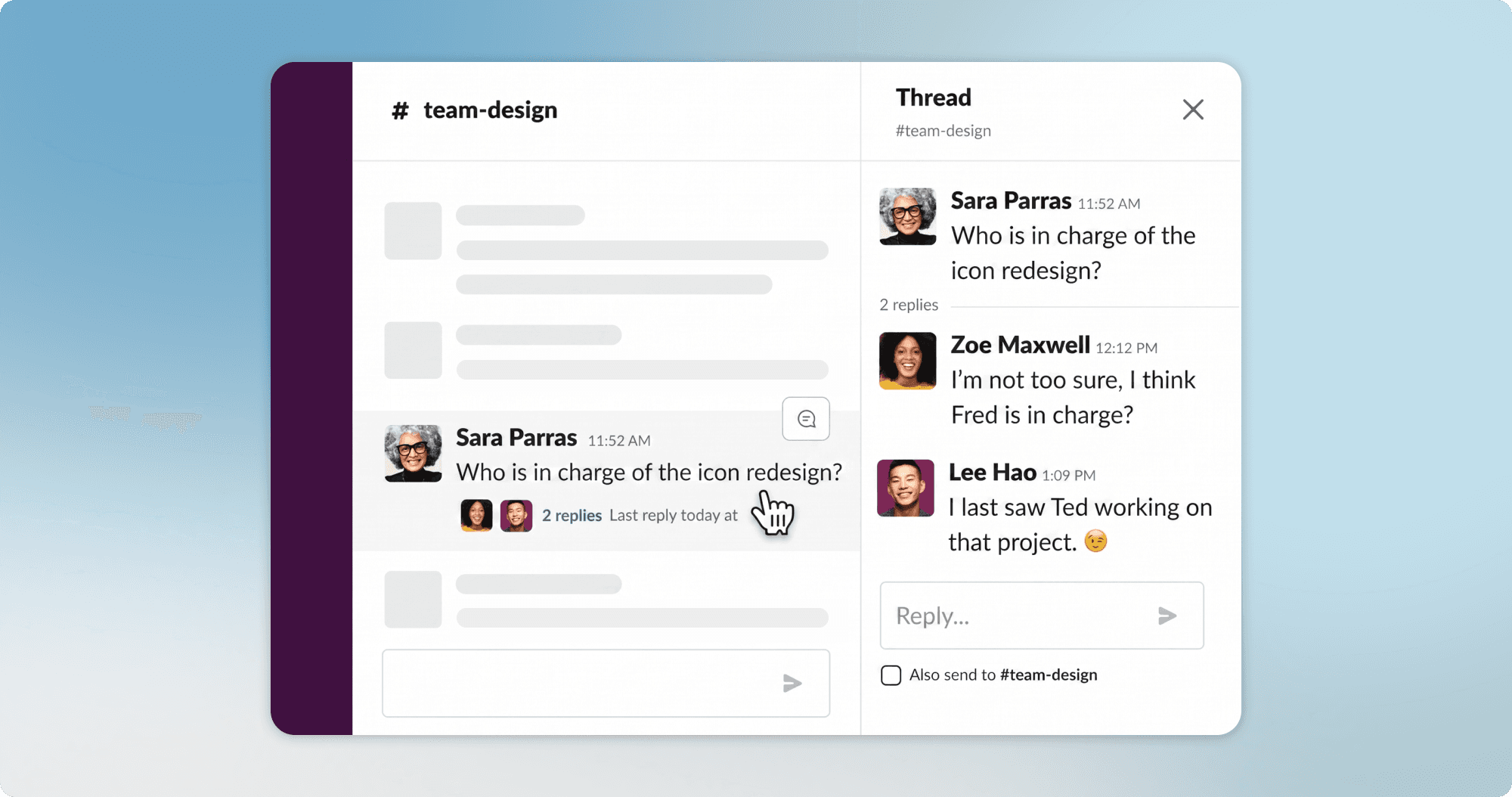
OWNERSHIP HUNTING / SLACK
OWNERSHIP HUNTING / SLACK
During a quick two week turn-around, I was tasked with designing an internal tool to help navigate our organizational structure of alliances, fleets, and squads making it easier for people to find other employees within our organization.
During a quick two week turn-around, I was tasked with designing an internal tool to help navigate our organizational structure of alliances, fleets, and squads making it easier for people to find other employees within our organization.
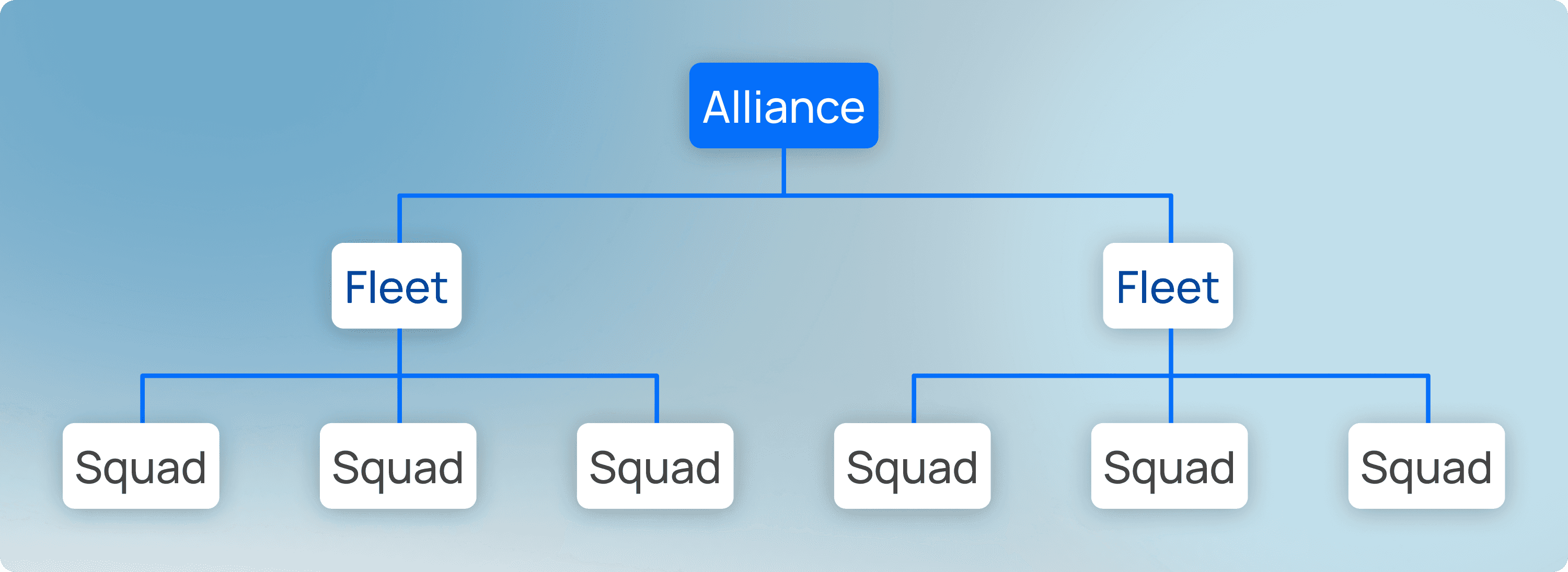
STRUCTURE HIERARCHY / ALLIANCES, FLEETS, & SQUADS
STRUCTURE HIERARCHY / ALLIANCES, FLEETS, & SQUADS
1.0
1.0
Alliance
Alliance
A cross functional group aligned around a major product area. Within alliances are sub-groups called fleets & squads.
A cross functional group aligned around a major product area. Within alliances are sub-groups called fleets & squads.
2.0
2.0
Fleet
Fleet
Fleets are mid-tier grouping within an Alliance. They cluster related Squads together.
Fleets are mid-tier grouping within an Alliance. They cluster related Squads together.
3.0
3.0
Squad
Squad
Squads are the actual delivery teams consisting of employees. Small, focused groups that own specific services or features.
Squads are the actual delivery teams consisting of employees. Small, focused groups that own specific services or features.
PROBLEM STATEMENT
PROBLEM STATEMENT
How might we create a dynamic organizational tool for stakeholders & employees to find who owns what and streamline cross-functional collaboration across all teams?
How might we create a dynamic organizational tool for stakeholders & employees to find who owns what and streamline cross-functional collaboration across all teams?
FINAL DESIGNS
FINAL DESIGNS
Line-Up is an internal tool to help employees navigate through teams to find who owns what.
Line-Up is an internal tool to help employees navigate through teams to find who owns what.
LineUp is an dynamic organizational tool designed to help you instantly find ownership while navigating across alliances, fleets, and squads.
LineUp is an dynamic organizational tool designed to help you instantly find ownership while navigating across alliances, fleets, and squads.
FINAL DESIGNS
FINAL DESIGNS
Navigate the organization chart
Navigate the organization chart
Look through each team and go through the organization chart to see who reports to who.
Look through each team and go through the organization chart to see who reports to who.
NAVIGATING THE ORG CHART / LINE-UP
NAVIGATING THE ORG CHART / LINE-UP
FINAL DESIGNS
FINAL DESIGNS
Search an employee by name.
Search an employee by name.
Search for someone specifically by name and find their profile easily.
Search for someone specifically by name and find their profile easily.
SEARCH BY NAME / LINE-UP
SEARCH BY NAME / LINE-UP
FINAL DESIGNS
FINAL DESIGNS
Alliances, Fleets, and Squads
Alliances, Fleets, and Squads
Navigate through the different alliances, fleets and squads to find who is on what team and which team owns what project or service.
Navigate through the different alliances, fleets and squads to find who is on what team and which team owns what project or service.
ALLIANCES, FLEETS, & SQUADS / LINE-UP
ALLIANCES, FLEETS, & SQUADS / LINE-UP
PROCESS
PROCESS
Mapping out the information architecture
Mapping out the information architecture
Before diving into the designs, I wanted to get a better understanding of our organizational structure so I mapped out every alliance, fleet, and squad to help develop a hierarchy for my design.
Before diving into the designs, I wanted to get a better understanding of our organizational structure so I mapped out every alliance, fleet, and squad to help develop a hierarchy for my design.
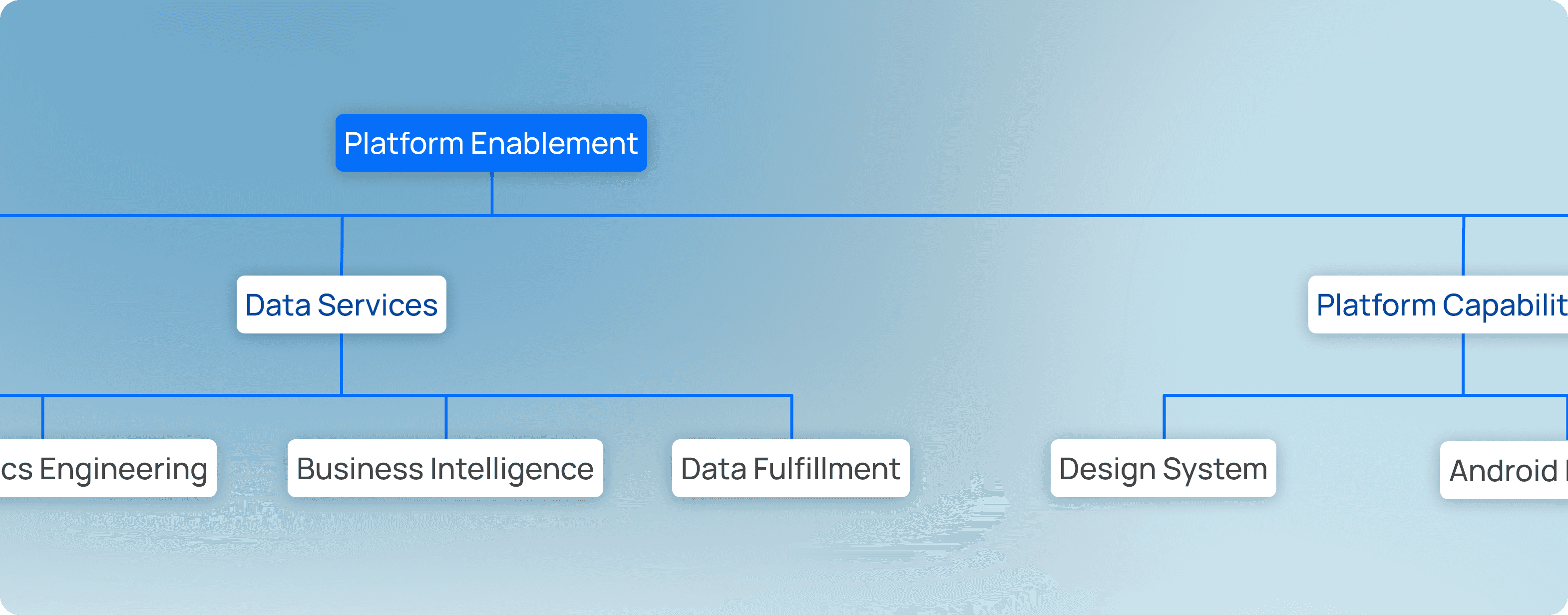
INFORMATION ARCHITECTURE / ALLIANCES, FLEETS, & SQUADS
INFORMATION ARCHITECTURE / ALLIANCES, FLEETS, & SQUADS
By studying the organizational structure, I was able to design the information architecture for LineUp and decide how each page would be organized.
ORG CHART
ORG CHART
Iteration 1 - Accordions & Pages
Iteration 1 - Accordions & Pages
During my first iteration, I opted for a design using accordions and pages to split up employees within the organization. Using progressive disclosure with accordions and separate pages, users can go through different people to find who reports to who.
During my first iteration, I opted for a design using accordions and pages to split up employees within the organization. Using progressive disclosure with accordions and separate pages, users can go through different people to find who reports to who.
ACCORDIONS & PAGES / ITERATION 1: ORG-CHART
ACCORDIONS & PAGES / ITERATION 1: ORG-CHART
ORG CHART
ORG CHART
Iteration 2 - Infinite Canvas
Iteration 2 - Infinite Canvas
During my second iteration, I designed an infinite canvas where users can drag & zoom in/out of the org chart. Cards can be expanded to see who the direct reports are. This represented a better mental model of an org chart and allowed for quicker find-ability.
During my second iteration, I designed an infinite canvas where users can drag & zoom in/out of the org chart. Cards can be expanded to see who the direct reports are. This represented a better mental model of an org chart and allowed for quicker find-ability.
INFINITE CANVAS / ITERATION 2: ORG-CHART
INFINITE CANVAS / ITERATION 2: ORG-CHART
In the end, I opted for the hybrid design as shown in the final designs, combining different aspects from each design. The hybrid model was created to prevent users from getting lost while also giving more structure and still keeping that mental model of an org chart.
In the end, I opted for the hybrid design as shown in the final designs, combining different aspects from each design. The hybrid model was created to prevent users from getting lost while also giving more structure and still keeping that mental model of an org chart.
DESIGN DECISIONS
DESIGN DECISIONS
Designing a unified card component
Designing a unified card component
During my process, I looked for the most important recurring information within each team such as number of members, services, and teams that fell under alliances, fleets, and squads.
During my process, I looked for the most important recurring information within each team such as number of members, services, and teams that fell under alliances, fleets, and squads.
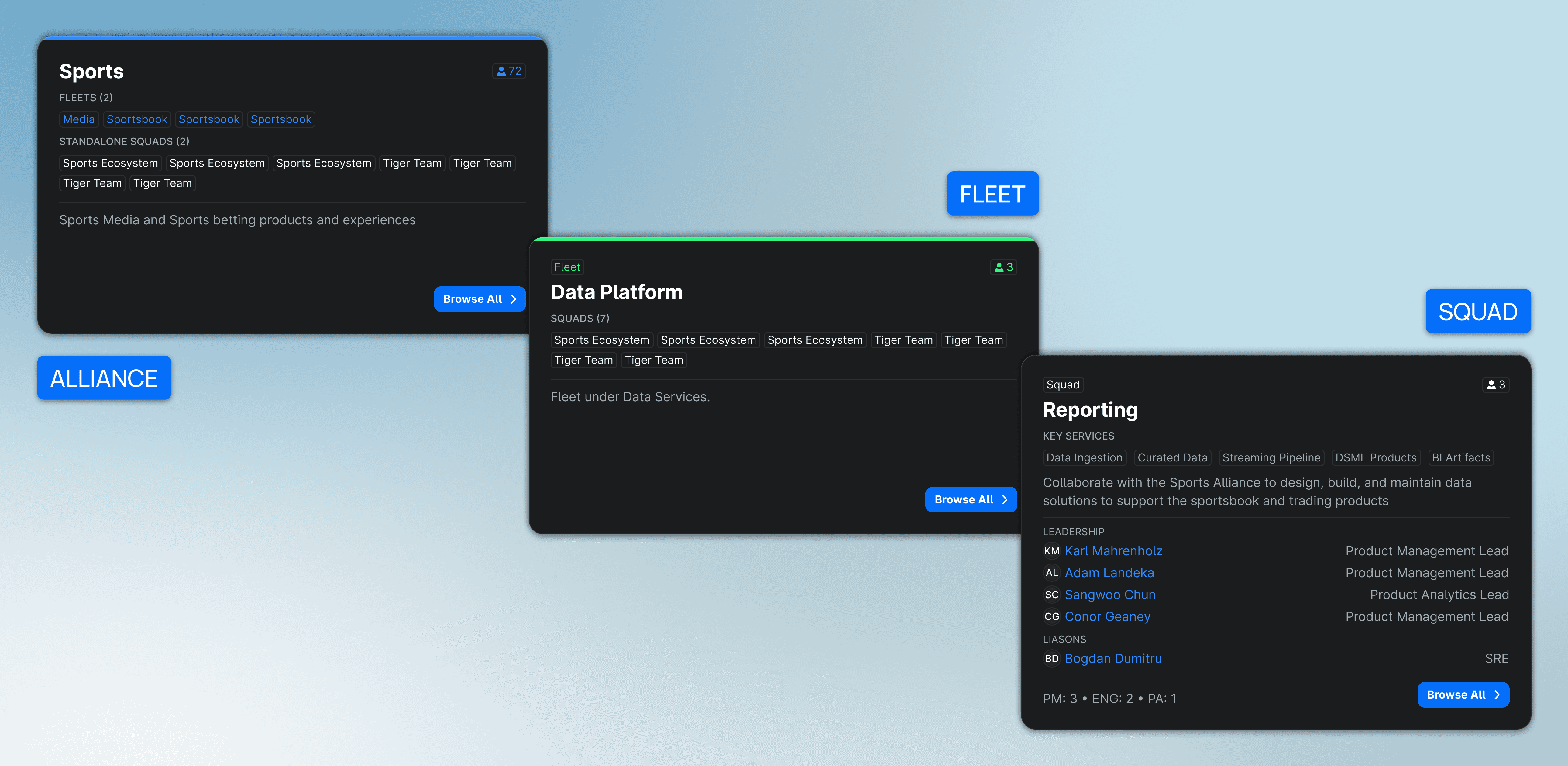
CARD COMPONENT / ALLIANCES, FLEETS, & SQUADS
CARD COMPONENT / ALLIANCES, FLEETS, & SQUADS
By creating one card component, I was able to create a unified design throughout the entire tool while also conveying important information to each user looking for a specific alliance, fleet or squad.
By creating one card component, I was able to create a unified design throughout the entire tool while also conveying important information to each user looking for a specific alliance, fleet or squad.
DESIGN DECISIONS
DESIGN DECISIONS
Creating a Tagging System
Creating a Tagging System
Within our design system, we had a tag component already created. By leveraging this component I could help bring clarity to users looking for a specific alliance, fleet or squad.
Within our design system, we had a tag component already created. By leveraging this component I could help bring clarity to users looking for a specific alliance, fleet or squad.
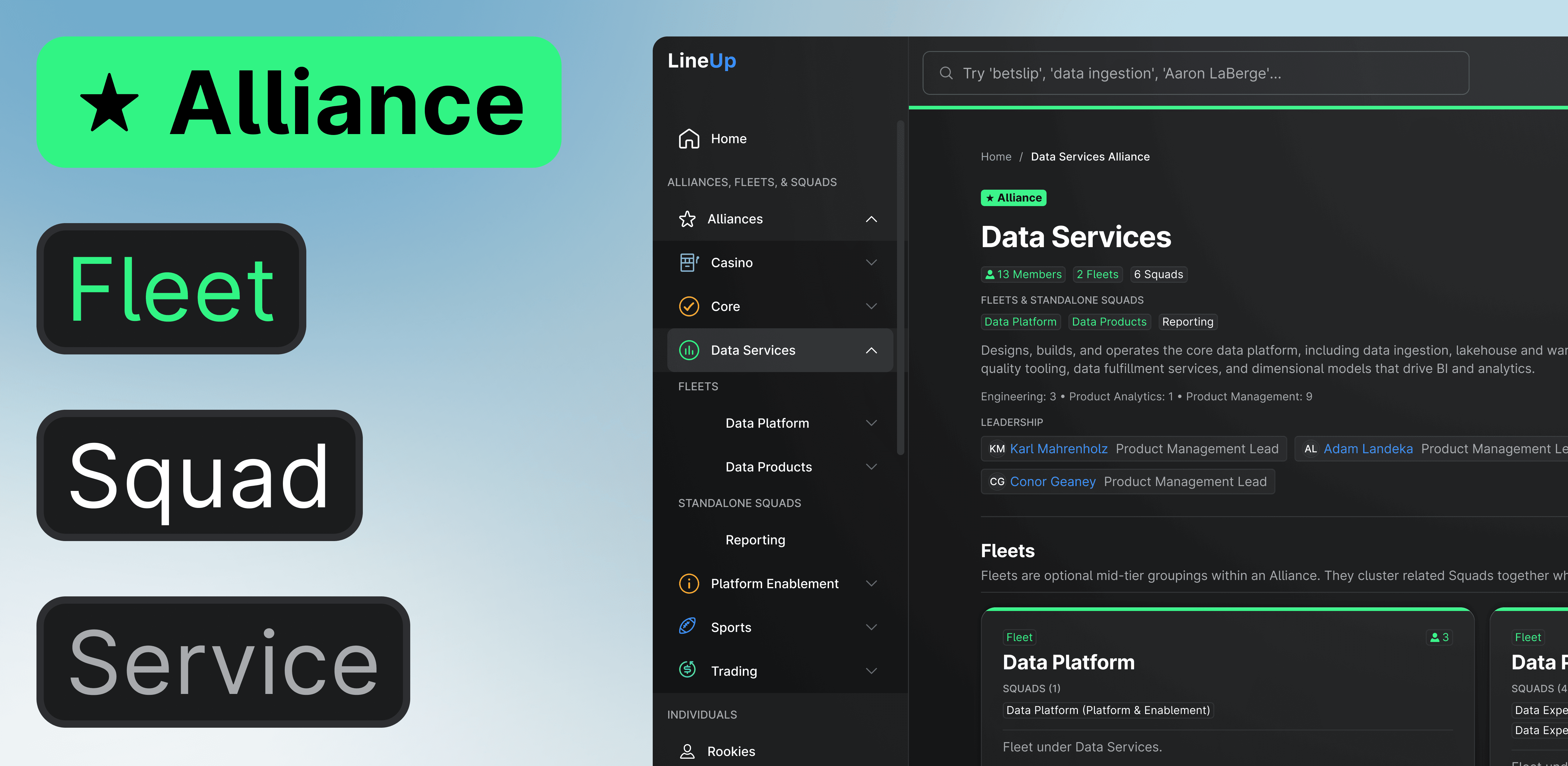
TAGS / ALLIANCES, FLEETS, SQUADS, AND SERVICES
TAGS / ALLIANCES, FLEETS, SQUADS, AND SERVICES
By giving each alliance, fleet, squad, or service a uniquely designed tag with a different treatment of colour, users can quickly identify and categorize different teams or services from a glance.
By giving each alliance, fleet, squad, or service a uniquely designed tag with a different treatment of colour, users can quickly identify and categorize different teams or services from a glance.
DESIGN DECISIONS
DESIGN DECISIONS
Colour Coding
Colour Coding
I colour coded each alliance, fleet, squad, or team to help users quickly identify what they were looking at.
I colour coded each alliance, fleet, squad, or team to help users quickly identify what they were looking at.
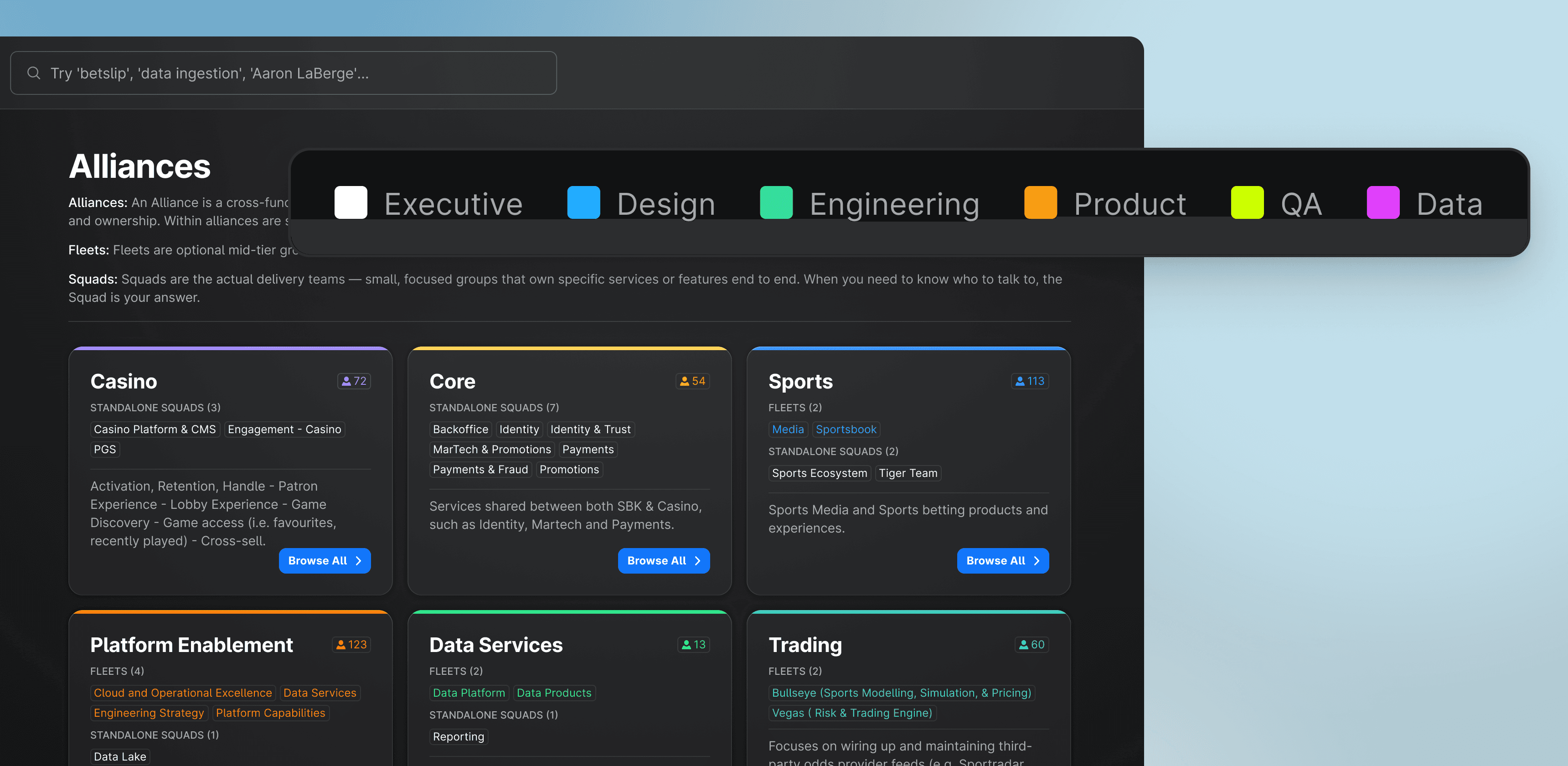
COLOUR CODING / ALLIANCES, FLEETS, SQUADS, AND TEAMS
COLOUR CODING / ALLIANCES, FLEETS, SQUADS, AND TEAMS
To ensure, there was no overlap between alliances, fleets, squads, and teams, I developed different colours that would not lead to any confusion.
To ensure, there was no overlap between alliances, fleets, squads, and teams, I developed different colours that would not lead to any confusion.
DESIGN DECISIONS
DESIGN DECISIONS
Side Navigation
Side Navigation
theScore Bet's website featured a side navigation component which I leveraged with a few changes to help users navigate LineUp.
theScore Bet's website featured a side navigation component which I leveraged with a few changes to help users navigate LineUp.
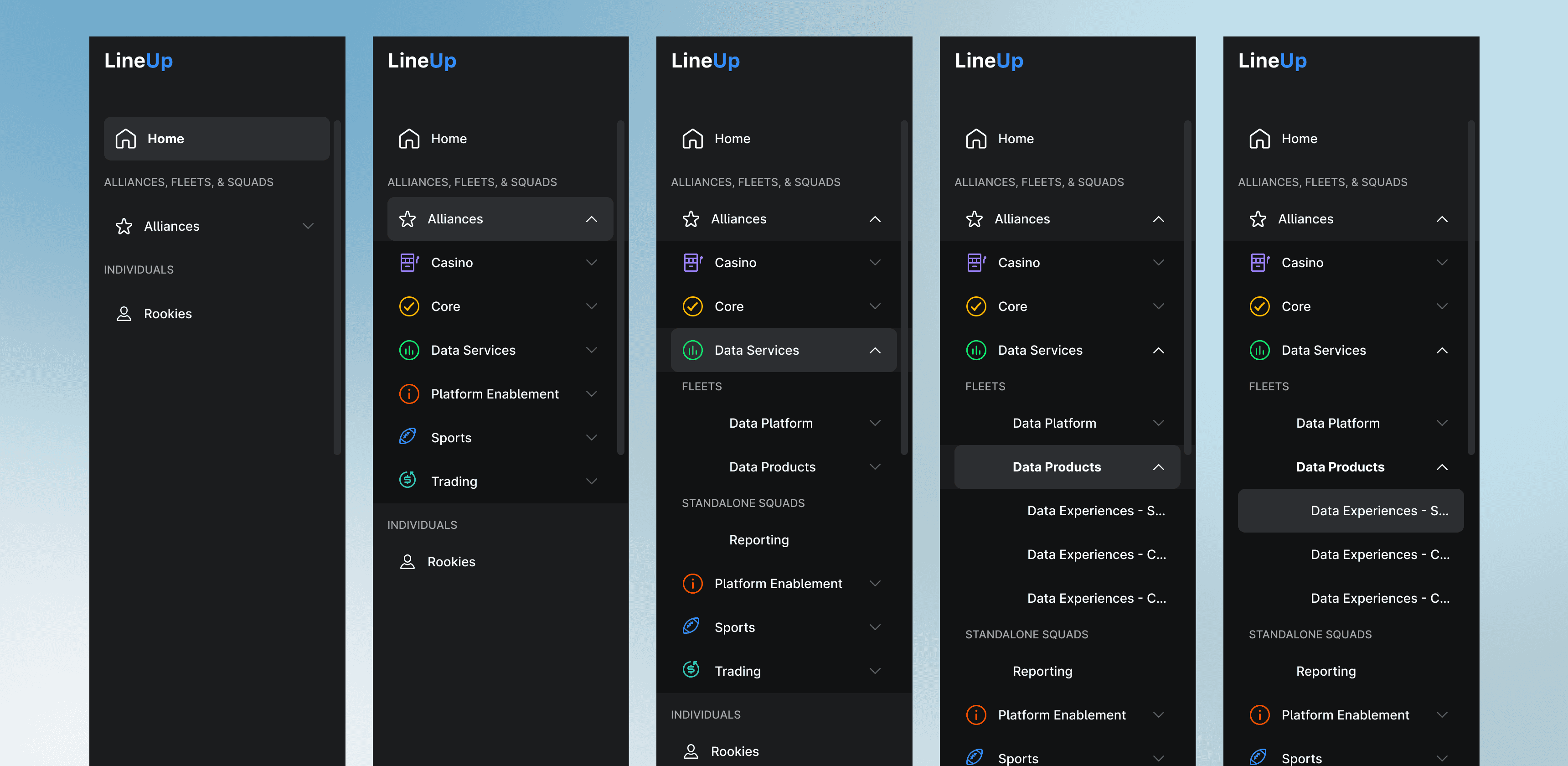
SIDE NAV BAR / NAVIGATION
SIDE NAV BAR / NAVIGATION
Using side navigation helped reduce the horizontal length of the card component making it easier for users to process information. Likewise, it also gave a good grounding of where users were within the tool helping improve navigation.
Using side navigation helped reduce the horizontal length of the card component making it easier for users to process information. Likewise, it also gave a good grounding of where users were within the tool helping improve navigation.
DESIGN DECISIONS
DESIGN DECISIONS
Designing a Modal
Designing a Modal
When users click on a profile, we needed a modal to help display information. I wanted to reuse the modal component on the profile page as well, as such I designed two different modals.
When users click on a profile, we needed a modal to help display information. I wanted to reuse the modal component on the profile page as well, as such I designed two different modals.
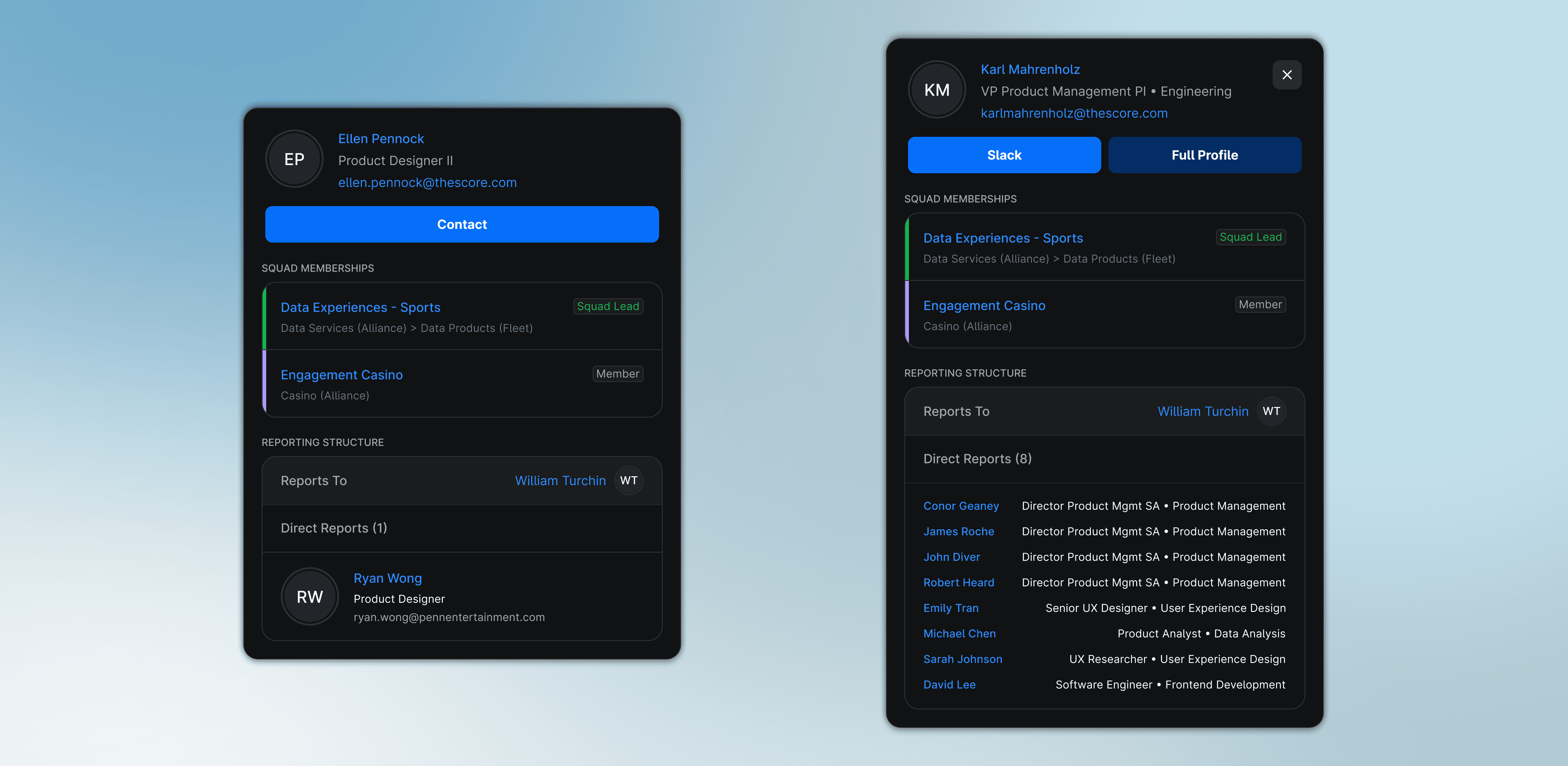
USER JOURNEY / FINDING THE GAPS
USER JOURNEY / FINDING THE GAPS
The modal on the left would be used on the profile page as it provided more information about the direct reports. However, the modal on the right would be used as a pop-up to help display more direct reports helping reduce scrolling on a modal.
The modal on the left would be used on the profile page as it provided more information about the direct reports. However, the modal on the right would be used as a pop-up to help display more direct reports helping reduce scrolling on a modal.
TAKEAWAYS
TAKEAWAYS
What did I learn?
What did I learn?
This was an incredible project where I learned a lot and even more exciting is that I handed off the designs to developers and they’ll be implementing it for the 1000+ employees at theScore!
This was an incredible project where I learned a lot and even more exciting is that I handed off the designs to developers and they’ll be implementing it for the 1000+ employees at theScore!
1.0
1.0
Designing Components in Figma
Designing Components in Figma
AI isn't great at making components look 'right' yet. I’ve found that if I design the first one, I can just let AI do the heavy lifting of scaling it across the rest of the project.
AI isn't great at making components look 'right' yet. I’ve found that if I design the first one, I can just let AI do the heavy lifting of scaling it across the rest of the project.
2.0
2.0
Vibe Coding as Prototyping Tool
Vibe Coding as Prototyping Tool
Vibe coding lets you speed things up and focus on how things actually feel when you use them allowing you to test out cool animations or transitions in no time.
Vibe coding lets you speed things up and focus on how things actually feel when you use them allowing you to test out cool animations or transitions in no time.
3.0
3.0
Importance of Colour
Importance of Colour
Color was a massive tool for helping people find their way around. It acts like a visual landmark, so users don't have to think twice about where they are or who they’re looking at.
Color was a massive tool for helping people find their way around. It acts like a visual landmark, so users don't have to think twice about where they are or who they’re looking at.
NEXT PROJECT
Creating a seamless and personalized experience for the number one transactional touchpoint on our app.

Made in Toronto with lots of Ninja Creami Protein Ice Creams.
© Selected Works / Ryan Wong
2026
Made in Toronto with lots of Ninja Creami Protein Ice Creams.
© Selected Works / Ryan Wong
2026